
Canva vs Canva Pro (2025) – Features, Pricing & Which One You Should Choose
Canva vs Canva Pro (2025) – Features, Pricing & Which One You Should Choose
🎨 Introduction
If you’ve ever designed a poster, presentation, or social media post online, you’ve probably used Canva — one of the most popular graphic design platforms in the world.
But as Canva keeps adding new AI-powered tools and premium content, many users wonder: “Should I upgrade to Canva Pro?”
In this blog, we’ll dive deep into the Canva vs Canva Pro comparison for 2025 — covering features, pricing, and real-world value — so you can choose the right plan for your needs.
🆓 Canva Free – What You Get
Canva’s free version is more powerful than many realize. It’s great for beginners, students, and small creators.
- Here’s what’s included:
- 250,000+ free templates
- Thousands of free photos, videos, and graphics
- Basic editing tools for images, text, and elements
- Option to download designs in PNG, JPG, and PDF formats
- Up to 5 GB of cloud storage
✅ Best for:
Casual users, students, freelancers just starting out, and anyone creating basic visuals like resumes, Instagram posts, or flyers.
💎 Canva Pro – What You Unlock
Canva Pro takes the creative experience to a professional level. It’s built for brands, content creators, marketers, and design teams who need speed, quality, and consistency.
Key Features You Get with Canva Pro:
- Premium Templates & Assets: Access to over 100 million+ stock photos, videos, audio tracks, and elements.
- Brand Kit: Upload logos, set your brand fonts and colors for consistent branding.
- Background Remover: Instantly remove image backgrounds in one click.
- Magic Resize: Resize a design for multiple platforms (Instagram, YouTube, Pinterest) without redoing the layout.
- AI Tools (Magic Studio): Use Magic Write for text generation, Magic Edit for photo retouching, and Magic Animate for motion graphics.
- 1TB Cloud Storage: Store and organize all your brand assets.
- Team Collaboration: Share, comment, and edit designs in real time.
✅ Best for:
Business owners, marketers, agencies, and social media creators who design regularly.
⚖️ Canva vs Canva Pro – Quick Comparison
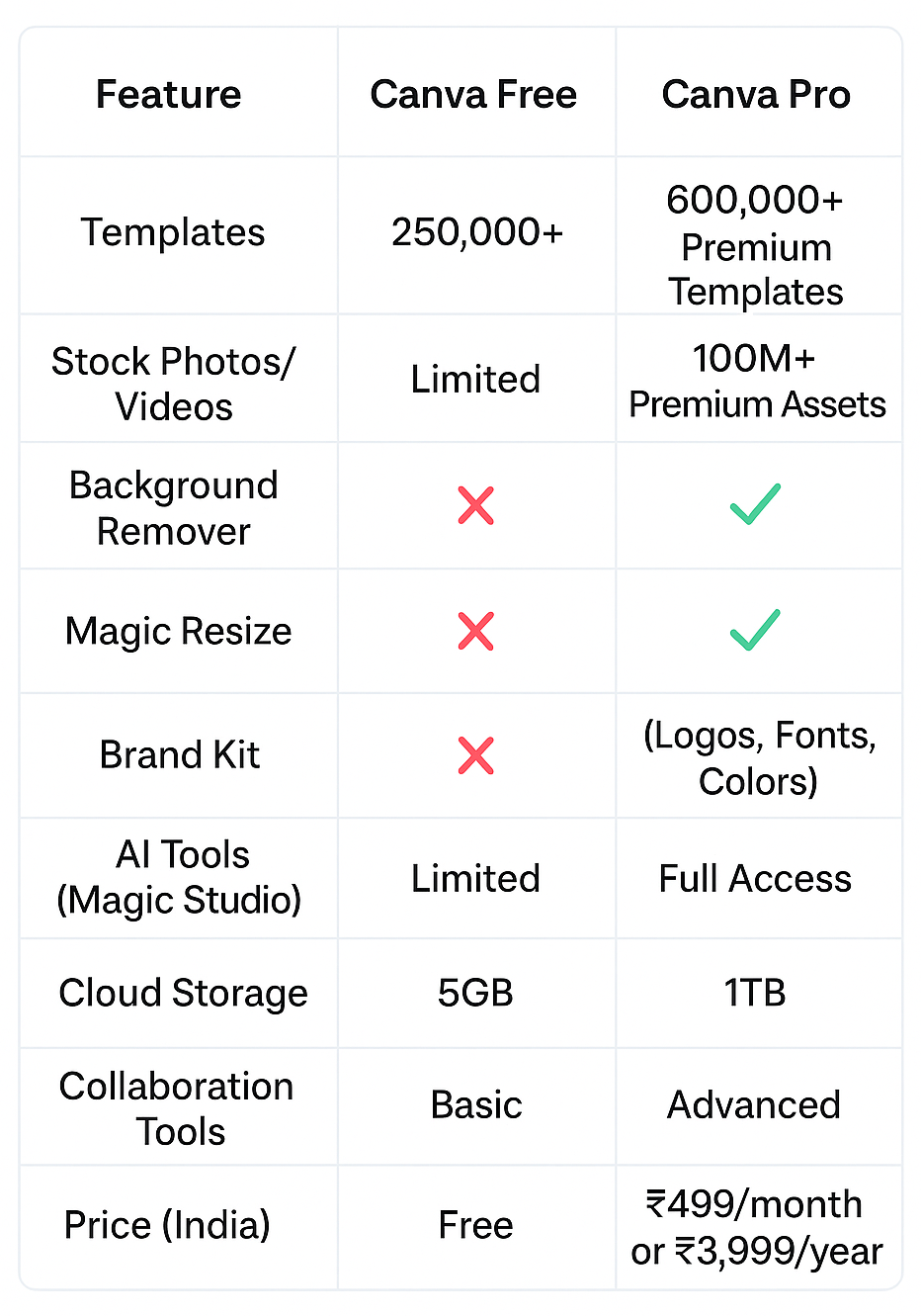
💰 Pricing in 2025
- Canva Free: ₹0 – No credit card needed
- Canva Pro (Individual): ₹499/month or ₹3,999/year
- Canva for Teams: Pricing varies based on the number of members
💡 Tip: Canva often offers a 30-day free trial of Canva Pro — try it before committing!
👍 Pros & Cons
Canva Free
Pros:
- 100% free, no subscription
- Easy to use for simple projects
- Access to quality templates
Cons:
- Limited premium assets
- No brand kit or background remover
- No AI automation features
Canva Pro
Pros:
- Access to all premium templates & elements
- AI-powered tools save huge amounts of time
- Consistent branding with Brand Kit
- Ideal for teams and creators
Cons:
- Subscription cost (though affordable)
- Some advanced AI features still evolving
🤔 So, Which One Should You Choose?
- ✅ Choose Canva Free if you’re a casual user, student, or hobbyist designer. It’s more than enough for small projects or personal use.
- 🚀 Choose Canva Pro if you run a business, handle social media, or want to maintain a strong brand identity. The time-saving features alone are worth the upgrade.
- If design is part of your daily workflow, Canva Pro pays for itself with the productivity boost and premium quality it offers.